Make yourself more recognizable with your Coursera Certificate LinkedIn profile
Coursera, the world’s leading online education platform, offers courses that award a degree or certificate upon completion. Once you’ve completed your courses and degree, you can register for your Coursera certificate LinkedIn profile. We’ll show you how to register on LinkedIn, one of the most popular social networking platforms.
Coursera Certificates

I think a well-crafted online course that helps people is the ultimate destination for an online business.
Like ebooks, it’s one of those business models where once you’ve created the course and uploaded it to an educational platform, you don’t have to do much more than that.
Of course, there are a lot of packaged products out there, like personal coaching and things like that, but having created an online course can be a huge asset for someone with an online business.
In that sense, I think Coursera’s platform goes above and beyond, and I think it’s great that they’re offering online courses that people need in their industry, even if they’re not taking a formal course.
I think they’ve really tapped into a need in this day and age where there’s a lot of interest in self-development, and I’m currently taking a course on Google data analytics on Coursera.
If you are interested in studying data analytics, you can check out my previous post about how the course is organized.
I chose the Coursera platform because I didn’t major in data analytics in college, but it’s something I’m interested in and I’m thinking about changing my career path in the future.
What made me choose Coursera was the certificate you receive after completing the course and the fact that it can be shared directly on your LinkedIn profile.
In this article, I’ll tell you how to share your Coursera certificate on your LinkedIn profile.
In Korea, people.com is still famous as a job search site, overseas, the Linkedin platform is mostly usedplatform.
Linkedin is a professional networking platform It is a professional networking platform that connects companies hiring and people looking for jobs, as well as a place to showcase your careerto showcase your career.
One of the great things about the LinkedIn platform is that you can share your Coursera Certificate on your LinkedIn profile in a very simple way.
This way, companies looking to hire you can see it, and other people can see it, making this part of your career stand out. So if you’re not on LinkedIn yet, it’s worth jumping in and seeing what it’s like.
I currently have a list of courses I’ve taken on my LinkedIn profile, and it makes me proud of what I’ve accomplished and makes me feel more motivated.
How to claim your Coursera Certificate LinkedIn profile
In order to add your Coursera certificate to your LinkedIn profile, the first step is to find the courses you’ve completed in Coursera. Here’s how to do that
1) Find completed courses on Coursera

On the Coursera homepage, click the Profile button in the top right corner, and then click Achievements to see a list of the courses you’ve completed.
In my case, I’ve completed two courses, so you’ll only see two, as shown above. And next to each course name, you’ll see an Add to Linkedin button, which will take you to your LinkedIn profile.
2) Enter your Coursera course information

This is the screen that appears when I clicked the Add to Linkedin button above. I didn’t have to fill in anything because it was already filled in. Just a quick confirmation and click the Save button.
3) Update information about your Coursera course

You will then be taken to a screen that says you are finished updating your license or certificate information. Next, click the Next button
4) Complete the registration of your Coursera Certificate LinkedIn Profile

This is actually the last step. Once you hit the Post button, you’re done with the registration process.
In fact, if you go to the Coursera homepage, find the Achievements menu and click on the Add to Linkedin button, it’s pretty easy from there. Let’s take a look at your Linkedin profile with your Coursera certificate.
5) LinkedIn profile with the certificate added
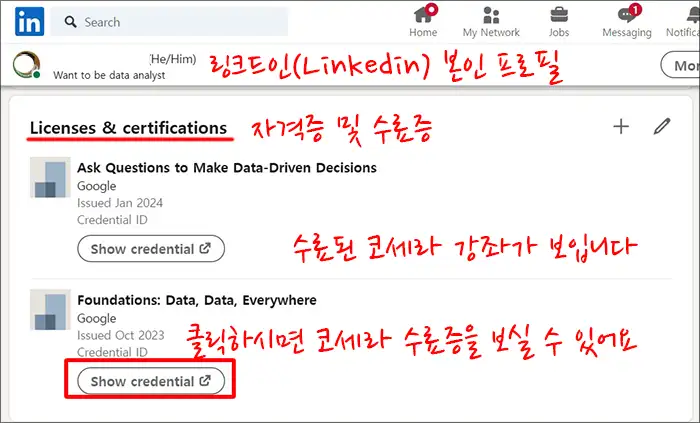
I’m on my LinkedIn profile, and one of the profile sections is Certifications and Certificates, and I see the courses I’ve taken at Coursera. I didn’t have any before, but now that it’s filled in, I feel proud of myself.
And when I clicked the Show credential button, I was taken to the Coursera screen, and you can see the course description and certificate as below.
You could see a Coursera Certificate LinkedIn profile from above image.

Finalize
Today we learned how to add a Coursera Certificate LinkedIn profile. I think it would be a great advantage for you to add your achievements to your profile to make yourself more marketable.
I’m currently about halfway through the eight-part course, and I’m definitely looking forward to completing them all and adding the final Coursera certificate to my LinkedIn profile. I would definitely recommend others to give it a try.