How to block channel message of kakaotalk in 30 seconds
One of the most annoying things about using KakaoTalk is the constant stream of channel advertisements, and it can be frustrating to have to scroll down to find them when you really need to check your chats. We’ll show you how to block channel message of kakaotalk right away.
Annoying KakaoTalk channel ad messages
Nowadays, it seems like there are a lot of ad channels on KakaoTalk when you sign up for a website, app, or just by chance. We’ve all had the experience of saying yes, yes, yes when it was necessary at first, but as it became more and more, we needed to see KakaoTalk.
How to block channel message in a nutshell
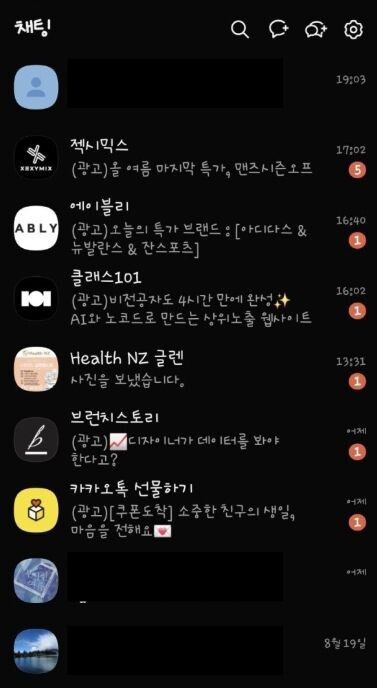
I’m a frequent user of Jeximix for workouts, Ably for clothes, and Class 101 for self-improvement, so I’ve created the above KakaoTalk ad channels.
At first, I didn’t know much about it and simply thought that if I just left the channel room, I would never be blocked again, but I was wrong. The KakaoTalk channel messages started coming in steadily after that.
If you’re experiencing any other inconveniences with KakaoTalk chat room notifications, please read the post below for an immediate fix.
How to block channel message in 30 seconds
I’ll show you how to block messages from the KakaoTalk channel using ZexiMix as an example. First, go to the KakaoTalk ZexiMix channel.
1) Click the Home button

When you enter the Xsemix channel, you’ll see a bunch of ad messages like the one above. Click on one of them to enter the Xsemix ad channel.
Then click the Home button (shaped like a house) in the top right of the photo above.
2) Click the CH KakaoTalk channel button

You are now on the home screen of the Xemix KakaoTalk channel. At the very top, you will see a CH button between a speech bubble and three dots. Click it.
3) Block the channel
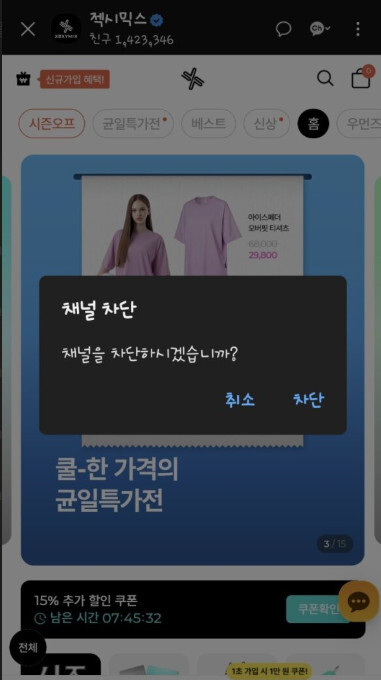
This is the screen that appears after you press the CH button. You’ll immediately see a pop-up message asking if you want to block the channel. Since you want to block it, click Block.
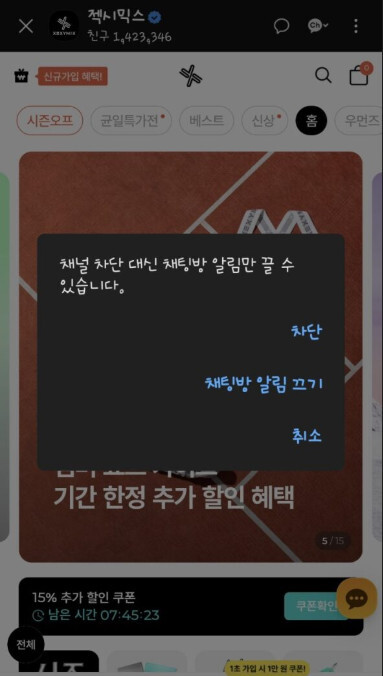
After blocking, they once again confuse us with a menu that says “Turn off chat room notifications” instead of “Block”, but if you are adamant and select the “Block” button, you will be blocked and will no longer receive messages from the channel.
If you’ve been using KakaoTalk lately and are looking for fun, cute emojis, take a look at the KakaoTalk Emoji Shopand you’ll find what you’re looking for.
Finalize
Today, we learned how to block messages on KakaoTalk channels. With this one step, I’m able to manage my chats with just my family and friends.
If you didn’t know how to do this and had a frustrating experience like I did, I encourage you to give it a try. You’ll have a clean and organized chat room.